Pay Online

Manage Your Loan From Your Phone

CashCo’s Pay Online service lets you make interest payments or renew your loan from home, work, or your mobile device. Save a trip, skip the line, and stay on top of your loan.

Pay Interest Make eligible interest payments
Renew Your Loan Use your phone or mobile device
Activation Code Request it inside the app
Chat Support Use the button at bottom right
English / Español

Pay Online Without Waiting in Line

CashCo Pay Online helps customers manage eligible pawn loan payments and renewals through the MobilePawn app.

Pay Online

We believe managing your loan should fit into your schedule, not disrupt it. CashCo’s secure Pay Online service allows you to make interest payments or renew your loan from the comfort of your home or mobile device.

This feature saves you a trip to the shop and helps you stay on top of your finances effortlessly, giving you control and peace of mind without needing to wait in line.
Pago en Línea

Creemos que administrar su préstamo debe adaptarse a su horario, no interrumpirlo. El servicio seguro de Pago en Línea de CashCo le permite realizar pagos de intereses o renovar su préstamo desde la comodidad de su hogar o dispositivo móvil.

Esta función le ahorra un viaje a la tienda y le ayuda a mantener sus finanzas al día sin esfuerzo, dándole control y tranquilidad sin necesidad de hacer fila.

Step by Step

How to Activate MobilePawn

Follow these steps to request your activation code and connect your mobile phone number with your loan or layaway ticket number.

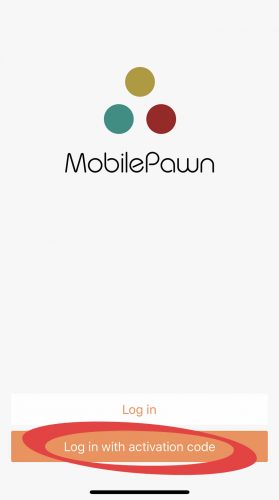
1
MobilePawn login screen showing Login with Activation Code

Select “Login with Activation Code”

Once the MobilePawn app is open, choose Login with activation code to begin the setup process.

2
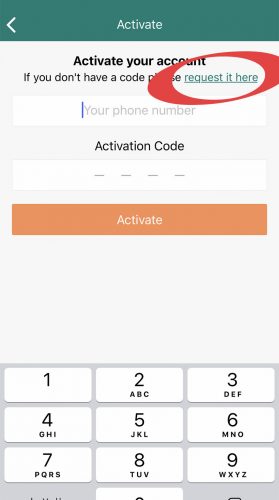
MobilePawn activation screen showing request it here link

Tap “request it here”

If you do not already have an activation code, tap request it here inside the app.

3
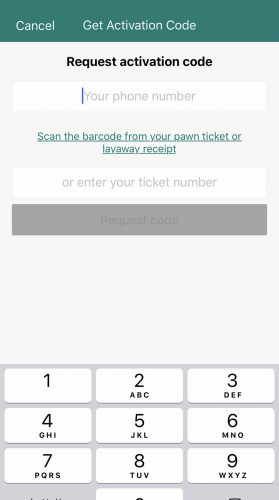
MobilePawn request activation code screen asking for phone number and ticket number

Enter your phone and ticket number

Enter your mobile phone number and your loan or layaway ticket number to request your activation code.

Please note: To receive an updated copy of your contract, visit CashCo in-store. CashCo will waive the lost ticket fee when you pay through the mobile app.
Before You Start

What You May Need for Pay Online

Having the right information ready can make the MobilePawn setup process easier.

Mobile Device

Use an iPhone, Android phone, tablet, or another compatible mobile device.

Ticket Number

Have your loan or layaway ticket number ready when requesting an activation code.

Mobile Phone Number

Enter your mobile phone number in the app when requesting the activation code.

Support Questions

Use the bottom-right support button, call CashCo, or visit the store if you need help.

Quick Questions

Pay Online FAQ

Common questions about using CashCo’s Pay Online service through the MobilePawn app.

What can I do with Pay Online?

You can use CashCo’s Pay Online service to make eligible interest payments or renew your loan from your mobile device.

Which app do I download?

Download the MobilePawn app using the Apple App Store link for iPhone or the Google Play link for Android.

How do I get an activation code?

Open the MobilePawn app, select “Login with Activation Code,” then tap “request it here” and enter your mobile phone number and loan or layaway ticket number.

What if I need an updated copy of my contract?

Visit CashCo in-store to receive an updated copy of your contract. CashCo will waive the lost ticket fee when you pay through the mobile app.

Can I get help before using the app?

Yes. Use the support button at the bottom-right of this page, call CashCo, use the contact page, or visit the store for assistance.

Ready to Pay Online?

Download the MobilePawn app, request your activation code, and manage eligible interest payments or loan renewals from your mobile device.

Online payment availability, renewal eligibility, app features, and account access may vary. Use your loan or layaway ticket information when requesting activation. For questions about your contract, updated copies, fees, payments, or loan status, contact CashCo Pawn Shop or visit in-store.